Lords of Words2.35
Publisher Description
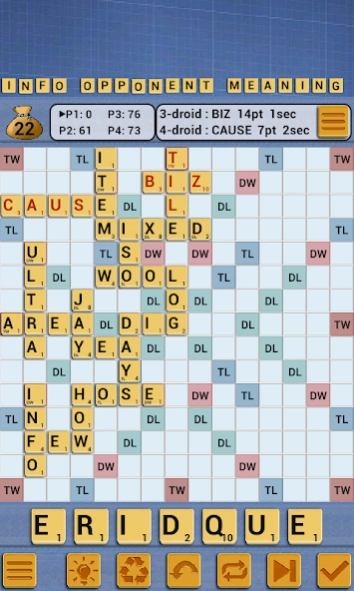


Lords of Words is a word game like Scrabble
Lords of Words is a word game like Scrabble in which two to four players score points by placing tiles, each bearing a single letter, onto a game board divided into a 15×15 grid of squares. The tiles must form words that, in crossword fashion, read left to right in rows or downward in columns and are included in a standard dictionary or lexicon.
Languages & Dictionaries :
- English (CSW or TWL06)
- French
- Italian
- German
- Български
- and 7 more
*** Up to 4 players ***
You can play against 3 phone players or 3 friends of yours in this game of words.
***This words game is appropriate for your children. Kids theme. ***
*** Your opponent's tiles are always shown ***
So there is no doubt about cheating.
**** Exclusive features ****
- less than 6MB
- 4 themes
- Random bonus tiles
- Play against your device
- Pass And Play mode for 2 players
- Word Definition by long press the word
- Pandora box feature
****
This words game is a great time killer for all fans of board games and strategy games.
About Lords of Words
The company that develops Lords of Words is GEIMZ - Board Games. The latest version released by its developer is 2.35.
To install Lords of Words on your Android device, just click the green Continue To App button above to start the installation process. The app is listed on our website since 2026-04-01 and was downloaded 11 times. We have already checked if the download link is safe, however for your own protection we recommend that you scan the downloaded app with your antivirus. Your antivirus may detect the Lords of Words as malware as malware if the download link to com.bp.divinewords.dwapp is broken.
How to install Lords of Words on your Android device:
- Click on the Continue To App button on our website. This will redirect you to Google Play.
- Once the Lords of Words is shown in the Google Play listing of your Android device, you can start its download and installation. Tap on the Install button located below the search bar and to the right of the app icon.
- A pop-up window with the permissions required by Lords of Words will be shown. Click on Accept to continue the process.
- Lords of Words will be downloaded onto your device, displaying a progress. Once the download completes, the installation will start and you'll get a notification after the installation is finished.
Program Details
System requirements
Download information
Pricing
Version History
version 2.35
posted on 2026-04-01
- optimized memory
version 2.05
posted on 2016-08-25
v2.04,- optimized memory
